Automatic redaction of personal data in the browser
Let’s use the last post, on building WebAssembly browser plug-ins in Rust, to create something useful: a browser plugin that redacts personally identifiable information (PII) in real time, as a user types or pastes text. The redaction happens instantly, without the user’s data ever leaving the browser.
The best way to show this in a demo is to have the browser’s network tab open (on Chrome: menu -> more tools -> developer tools, click on network tab). Then type some text in the web demo, and show that the redaction is happening without any network traffic, so the text is getting cleaned up without leaving the browser.
Why this is relevant right now
Under GDPR, using LLMs come down to trust: we promise not to train with customer data, we promise to delete it, and we ensure EU residency. These promises are contractual and may require legal review, including trusting an organisation on another continent.
Client-side redaction as implemented here turns this upside-down: if the personal data never leaves the browser, there is no transfer to log, no processing to audit, and no deletion to action. Technical impossibility is a much stronger control than contractual assurance, and using a plug-in like the one described in this post provides that level of safety.
The setup
First, create a project like in the last blog post, and call it something
like pii-redactor:
cargo new --lib pii-redactor
cd pii-redactor
cargo add wasm-bindgen
As before, this creates the new project, with code in src/lib.rs, the contents of which we will shortly replace.
Create the binding code for your plugin
Edit the Rust program src/lib.rs, and add code to act as the glue between JavaScript and the Rust function, for example:
// Rust WebAssembly model for redacting PII substrings in a string by,
// replacing them with tokens.

// Imports for WebAssembly
use wasm_bindgen::prelude::*;

mod redact;
use crate::redact::redact;

// Redact a string by replacing PII with tokens
#[wasm_bindgen]
pub fn wasm_redact(text: &str) -> String {
    redact(text)
}
As in the previous post, this defines a function which is exposed to JavaScript. It takes a string reference, and replaces all patterns that match pii with tokens. For example, “31/03/2026” would be replaced with “[DATE]”.
Note that the redact() function itself is in a separate module.
Defining the patterns to look for
The code to find and replace the patterns is in lib/redact.rs, and is just a long set of regular expressions, and a function to find them and replace them with the tokens.
The patterns to look for dates look like this, to capture several different date formats:
static DATE_PATTERNS: LazyLock<Vec<Regex>> = LazyLock::new(|| {
    [
        r"\b\d{1,2}/\d{1,2}/\d{4}\b",   // dd/mm/yyyy
        r"\b\d{1,2}\.\d{1,2}\.\d{4}\b", // dd.mm.yyyy
        r"\b\d{4}-\d{1,2}-\d{1,2}\b",   // yyyy-mm-dd (ISO 8601)
        r"\b\d{1,2}\.\d{1,2}\.\d{2}\b", // dd.mm.yy       e.g. 05.01.64
        r"\b\d{1,2}-\d{1,2}-\d{4}\b",   // dd-mm-yyyy     e.g. 05-01-2064
        r"\b\d{4}/\d{1,2}/\d{1,2}\b",   // yyyy/mm/dd     e.g. 2064/01/05
        r"\b\d{1,2}\.\s?(Januar|Februar|März|April|Mai|Juni|Juli|August|September|Oktober|November|Dezember)\s\d{4}\b",
                                        // dd. Monat yyyy e.g. 5. Januar 2064
        r"\b\d{1,2}\.\s?(Jan|Feb|Mär|Apr|Mai|Jun|Jul|Aug|Sep|Okt|Nov|Dez)\.?\s\d{4}\b",
                                        // dd. Mon yyyy   e.g. 5. Jan. 2064
        r"\b(Januar|Februar|März|April|Mai|Juni|Juli|August|September|Oktober|November|Dezember)\s\d{4}\b",
                                        // Monat yyyy     e.g. Januar 2064
        r"\b\d{1,2}\.\d{1,2}\.\B", // dd.mm. without year, e.g. "am 05.01." (\B: not followed by a digit or letter)
    ]
    .iter()
    .map(|p| Regex::new(p).expect("invalid date regex"))
    .collect()
});
There are similar blocks for times, IBAN account numbers, tax ID numbers, IP addresses, social insurance numbers, phone numbers, postal addresses, and e-mail addresses.
These regular expressions are compact and fast to parse and search, if not easy to read. For the types of PII specified above, they are pretty effective. Some, like the addresses, will not catch all valid values, and could be refined by using lookup tables. Others can be improved by using algorithms, e.g., validating IBAN numbers by calculating the checksum.
Note that I developed and tested the PII checks against an interesting dataset from Hugging Face, containing JSON files with thousands of strings containing PII for different countries (I just used Germany).
Even with help from my good friend Claude, the process of finding and encoding rules to find PII is a bit of a rabbit hole, and can become very complex quickly. The code below is simple enough to be useful, but also shows the potential. I also created a more complex example with additional patterns, including first & last name searches, and IBAN checksum verification. It still runs very fast.
Searching for the patterns
The code to actually find these patterns in the input string, and to transform the input, is a long but simple function that applies each set of patterns against the string, over and over again, so any number of patterns can be found. Here is a snippet, with just the e-mails:
pub fn redact(text: &str) -> Result<String> {

    // Make a copy of the input
    let mut result = String::from(text);

    // Look for email address patterns
    for re in EMAIL_PATTERNS.iter() {
        result = re.replace_all(&result, "[EMAIL]").into_owned();
    }

    // ... other checks follow, similar format


    // Return altered string
    Ok(result)
}
Embedding it into the web page
You can attach this function to a textarea on a web page, so that personal data is immediately converted into anonymous tokens, as you type, using JavaScript similar to the previous blog post:
<!doctype html>
<html lang="en-US">
  <head>
    <meta charset="utf-8" />
    <title>WASM example</title>
  </head>
  <body>

    <p>Enter text, PII will be redacted:</p>
    <textarea id="text1" style="width: 100%; height: 200px"></textarea>

    <script type="module">

      // Import from the WASM module and its JavaScript glue
      import init, { wasm_redact } from "./pkg/wasm_pii_redactor.js";
      await init();

      function redact_text() {
        var t = document.getElementById("text1");
        t.value = wasm_redact(t.value);
      }


      // Attach event handlers to elements (cannot use in-line handlers here)
      document.getElementById("text1").addEventListener("input", redact_text);

    </script>

  </body>
</html>
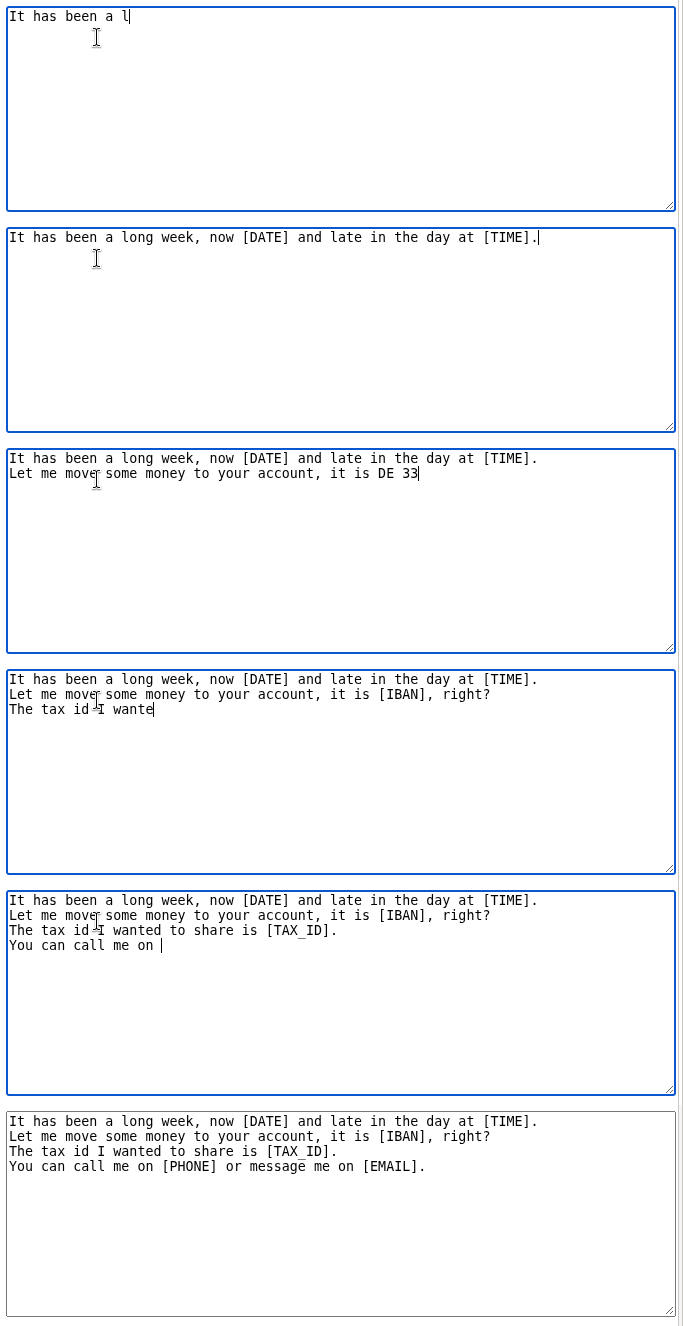
And that’s it. If you build the project and load this web page (serving it from a web server, not as a file), you can see your input get redacted in real time as you type. Here is a screen capture of a session:
Code for this project is here.